The Upgrade Plan Was Ready. Avi Was Not.
Some upgrade issues are straightforward.
This was not one of them.
We were working through a VCF 9.0.2 management domain upgrade when SDDC Manager stopped us before the plan could move forward. The odd part was that SDDC Manager itself was already running 9.0.2, so at first glance the error felt a little backwards.
Why would SDDC Manager block a VCF 9.0.2 upgrade plan when SDDC Manager was already on 9.0.2?
The answer came down to interoperability.
More specifically, it came down to NSX ALB / Avi Load Balancer.
The Setup
The goal was to plan the management domain upgrade to the VCF 9.0.2 target stack.
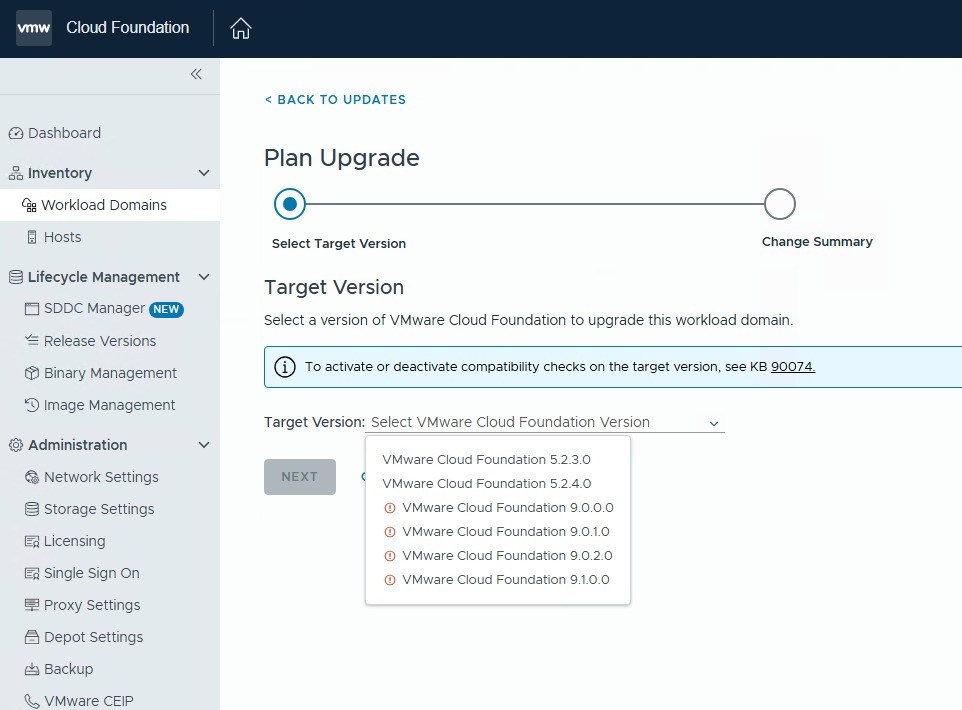
SDDC Manager was already at version 9.0.2, but the management domain components still needed to move to the desired target state. When we selected the Plan Upgrade workflow, VCF 9.0.2.0 appeared as an available target version.
Once the plan was selected, SDDC Manager returned a compatibility error and would not allow the workflow to continue.
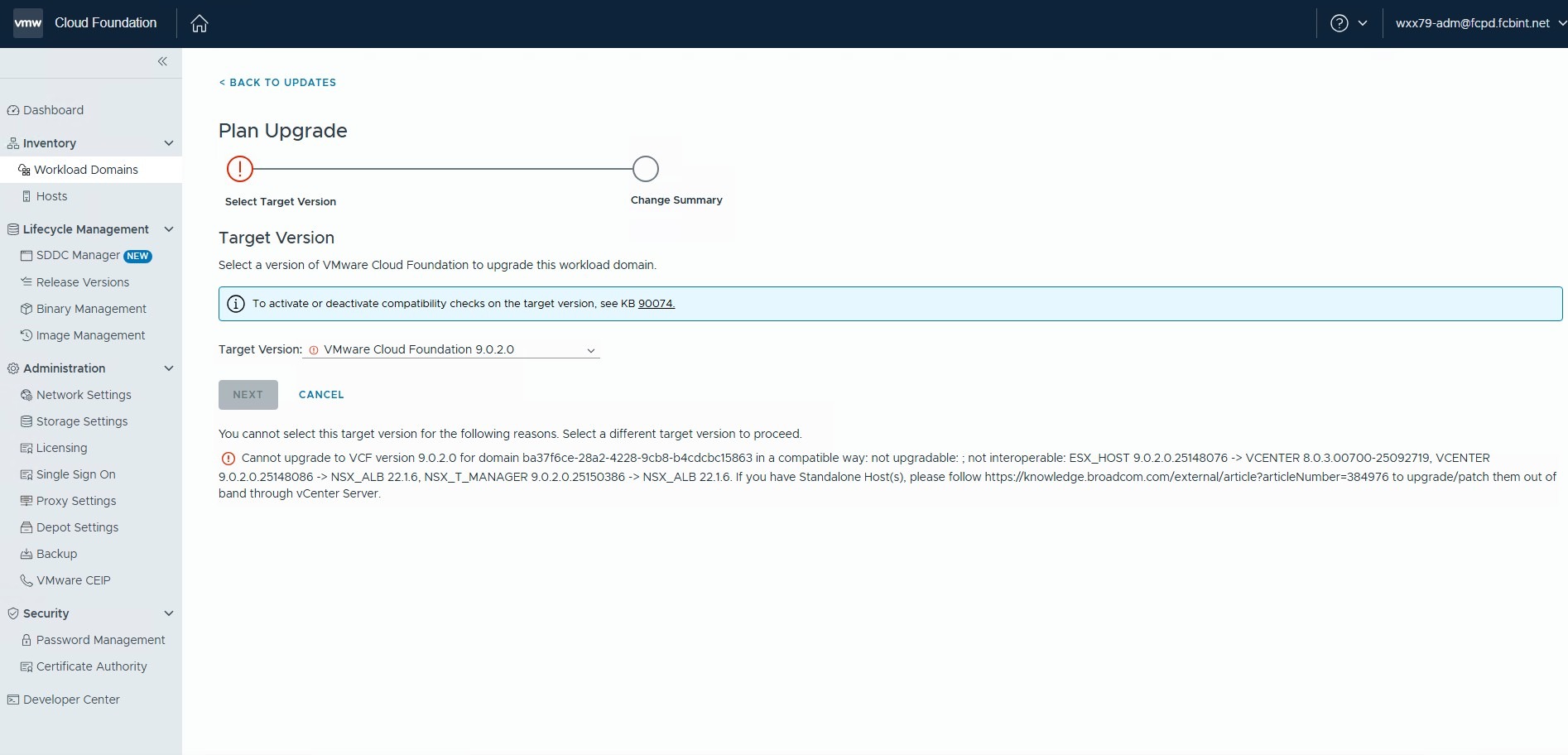
The full message included several component relationships, but the important compatibility relationships were:
| Target Component | Existing Dependency | Compatibility Result |
|---|---|---|
| vCenter 9.0.2.0 | NSX ALB / Avi 22.1.6 | Not interoperable |
| NSX Manager 9.0.2.0 | NSX ALB / Avi 22.1.6 | Not interoperable |
That was the clue.
SDDC Manager was not simply checking whether the SDDC Manager appliance was already on the right version. It was validating whether the management domain components could move to the target VCF 9.0.2 component stack in a compatible way.
In this case, NSX ALB / Avi 22.1.6 did not line up with the target VCF 9.0.2 components.
Why the Error Was Confusing
The error message was noisy.
It referenced ESXi, vCenter, NSX Manager, NSX ALB, and even included guidance for standalone hosts. When you see a message like that during a VCF upgrade, the first instinct is to start chasing vCenter, ESXi, or NSX version mismatches.
That was part of the initial investigation.
There was also a question of whether this was a back-in-time upgrade restriction, where a currently installed component build is newer than the build included in the target VCF release.
After checking the vCenter, ESXi, and NSX versions, that was ruled out.
The actual blocker was Avi.
The First Blocker
The management domain upgrade plan was blocked because Avi Load Balancer 22.1.6 was not compatible with the target VCF 9.0.2 component stack.
The same compatibility relationships pointed back to one dependency: NSX ALB / Avi 22.1.6.
That is the part that mattered.
VCF lifecycle management is not only about SDDC Manager, vCenter, ESXi, and NSX. If NSX ALB / Avi is part of the environment, it can become part of the compatibility chain.
In this case, Avi appeared to be maintained separately from SDDC Manager lifecycle management. Even so, it still showed up as part of the compatibility validation for the management domain upgrade plan.
That was the important distinction.
Avi may not have been the component we were actively trying to upgrade inside SDDC Manager, but it still had to be compatible with the target VCF 9.0.2 stack.
The Fix
The compatibility checks pointed squarely at NSX ALB / Avi 22.1.6.
Based on the interoperability findings, the next step was clear: Avi would need to be upgraded before the management domain upgrade could move forward.
At that point, the path seemed straightforward.
Upgrade Avi. Return to SDDC Manager. Continue with the VCF lifecycle workflow.
The next part was figuring out which Avi version made sense for the VCF 9.0.2 path.
The Dependency Path
This issue was part of a larger dependency path:
- Management domain upgrade planned
- SDDC Manager Plan Upgrade blocked
- Compatibility check points to NSX ALB / Avi 22.1.6
- Avi must be upgraded before the VCF upgrade can proceed
That is what made this one worth documenting.
The first blocker explained why the management domain upgrade could not move forward yet.
The Lesson Learned
The big takeaway is this:
VCF upgrade planning is only as clear as the full interoperability chain.
In this case, the issue was not that Avi was ignored. The issue was understanding where Avi fit into the VCF 9.0.2 upgrade path and what version was required before the management domain upgrade could continue.
That was not immediately obvious.
Avi / NSX ALB appeared to be a standalone deployment rather than something directly lifecycle-managed by SDDC Manager. Because of that, the upgrade path was not as simple as looking at the SDDC Manager bundle and assuming every dependency was covered.
The Plan Upgrade workflow made it clear that SDDC Manager was still evaluating Avi as part of the target compatibility state. The challenge was figuring out which Avi version was supported with the VCF 9.0.2 target components.
Before planning a VCF upgrade, check more than the obvious components.
At minimum, validate:
- Current SDDC Manager version
- Current management domain component versions
- Target VCF component versions
- NSX Manager compatibility
- vCenter and ESXi upgrade path
- NSX ALB / Avi version compatibility
- Whether Avi is lifecycle-managed by SDDC Manager or maintained separately
- Any documented back-in-time upgrade restrictions
- Broadcom Product Interoperability Matrix results
This issue was a good reminder that VCF upgrades are not just version upgrades. They are dependency upgrades.
And sometimes the hardest part is not fixing the blocker.
It is figuring out which dependency is actually blocking you.
Part 2 Coming Soon
Upgrading Avi was the next step, but the upgrade path was not as obvious as it first looked.
In the next post, I will walk through what happened when we checked the Broadcom Interoperability Matrix, why Avi / NSX ALB 22.1.6 not appearing as a selectable version mattered, and how GSS helped confirm that we could upgrade directly to Avi / NSX ALB 31.2.1 before continuing with the VCF 9.0.2 management domain upgrade.
Continue the Conversation
Have a question, a different approach, or something you have learned from the field?
Join the VCF Insider Community to connect with other engineers, homelab builders, and virtualization folks working through real-world VCF deployments, troubleshooting, automation, architecture, and lessons learned.