I ran into a fun one while deploying VCF Management Services in a VCF 9.1 environment. And by fun, I mean the kind where the UI tells you almost nothing, the logs do not point to the bad field, and you end up opening a support case for something that should have been caught in the wizard.
The install stopped with a generic Invalid input message.
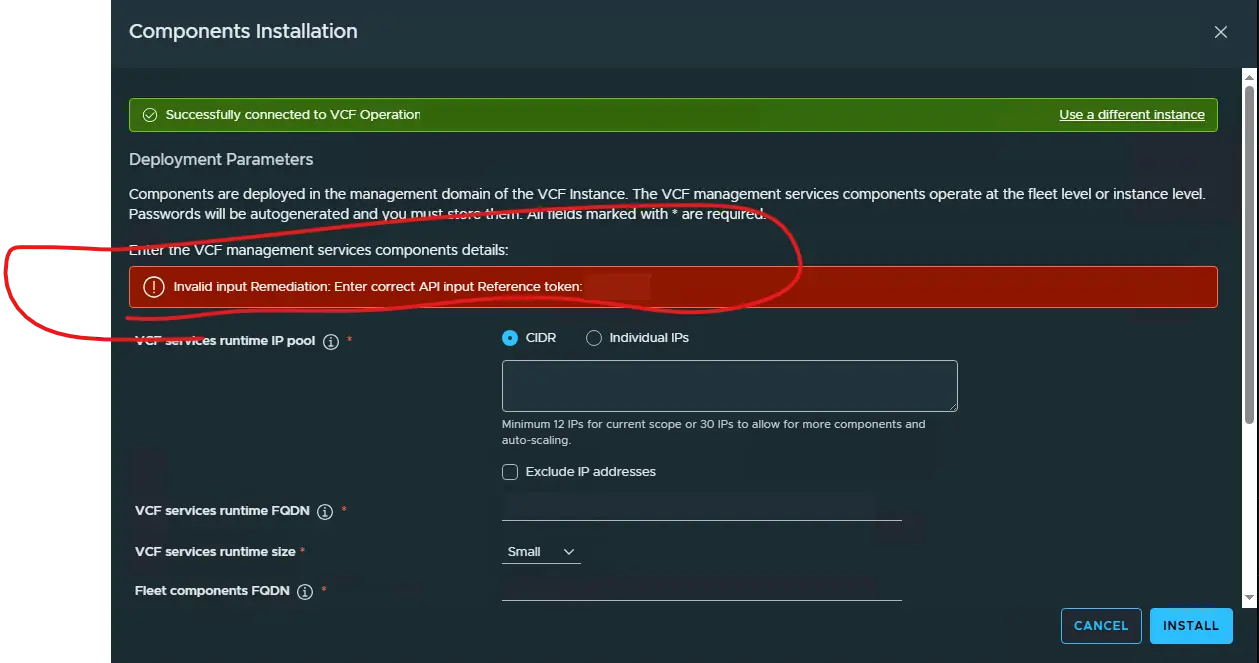
That was it. No field name. No password warning. No hint that one specific value was the problem. Just a generic remediation and a reference token that meant nothing to us from the deployment screen.
That is where the time started getting wasted. When you are looking at the Management Services deployment screen, there are several things that could be wrong. FQDNs, DNS, IP pool, CIDR, passwords, certificates, something in VCF Operations, something in SDDC Manager. Take your pick.
So we did what most engineers would do. We went back through the inputs and checked the obvious stuff first. The values looked right, the environment had already made it past the earlier parts of the workflow, and nothing jumped out as obviously broken.
Then we checked the logs. Same story. The logs showed that the workflow failed, but they did not tell us which field failed validation. They did not say the password was too short. They did not say which password policy was being enforced. They did not give us anything actionable.
At that point, we opened a P2 case and uploaded the SDDC Manager support bundle. Support reviewed it, but even they had to go back to VMware engineering to figure out what the reference token was actually tied to.
The answer was a password that did not meet the minimum length requirement.
The Actual Cause
The password entered during the VCF Management Services deployment was shorter than the 15-character minimum required by the default VCF Services Runtime password policy.
Broadcom documents the password requirements in KB 444448. The password must include at least:
- 15 characters
- One lowercase character
- One uppercase character
- One number
- One special character
That password is used as the initial password for vmware-system-user and admin@vsp.local in the VCF Services Runtime.
The policy itself is not the problem. A 15-character minimum is fine. The problem is that the deployment let us get all the way to install, then failed with Invalid input, and neither the UI nor the logs told us the password was the issue.
That is the part that bothers me. If the password does not meet the policy, tell me that. It does not have to be pretty. It just needs to be useful.
Instead, we got a reference token and had to wait for engineering to translate it. Another thing I’ve noticed during my VCF 9.1 upgrade Odyssey is password requirements differ between some of the appliances. Some appliances require a less restrictive character limit/requirements. IMO, VMware dev teams need to come to a consensus and settle on a standard across the board.
Once we changed the password to meet the full policy, the original Invalid input error was gone.
The Next Failure
After fixing the password, the deployment moved forward and then failed during Cloud Proxy registration validation.
This time the error was at least pointed in the right direction:
VCF Instance Cloud Proxy Registration validation failed
The dedicated Cloud Proxy was deployed and online, but the VMware Cloud Foundation infrastructure integration in VCF Operations was still assigned to the Default Group. That was enough to break the Management Services deployment validation. Broadcom covers this in KB 443889.
The fix was to edit the VCF infrastructure integration in VCF Operations and move it from the Default Group to the dedicated Cloud Proxy:
- Go to Administration > Integrations.
- Edit the VMware Cloud Foundation infrastructure account.
- Under VCF Credentials, find Cloud Proxy / Group.
- Change it from Default Group to the dedicated Cloud Proxy under Ungrouped Collectors.
- Save the integration and retry the Management Services deployment.
Once I switched the collector over to the dedicated Cloud Proxy, the validation passed and VCF Management Services deployed successfully.
What I Would Check First
If I hit this again, I would check two things before spending much time digging through logs.
First, make sure the Management Services password is at least 15 characters and meets the full VCF Services Runtime complexity policy. Do not assume the wizard will tell you if it does not.
Second, make sure the VMware Cloud Foundation infrastructure integration in VCF Operations is assigned to the dedicated Cloud Proxy, not the Default Group.
Those are the two things that mattered in this case. The frustrating part is that the first issue was easy to fix but hard to find. The product already knew the password did not meet the policy. It just did not tell us that in a useful way.
The second issue was cleaner. The error pointed toward Cloud Proxy registration, and the KB matched what we were seeing.
That is why I wanted to write this one down. If you are deploying VCF 9.1 Management Services and you get the generic Invalid input message, do not immediately start tearing apart every FQDN, IP, and certificate in the wizard. Check the password length first, then check the Cloud Proxy assignment. It might save you a support case, or at least save you from burning time on the wrong part of the deployment.
References
- Broadcom KB 444448: Resetting Passwords for VMware Cloud Foundation Services Runtime
- Broadcom KB 443889: Error when deploying VCF Management Services during VCF 9.1 upgrade—VCF Instance Cloud Proxy Registration validation failed
Continue the Conversation
Have a question, a different approach, or something you have learned from the field?
Join the VCF Insider Community to connect with other engineers, homelab builders, and virtualization folks working through real-world VCF deployments, troubleshooting, automation, architecture, and lessons learned.