I have spent a lot of time around VCF 9.1 lately, both working through my own deployment issues and helping our Ops team with an upgrade from VCF 9.0.2. One thing keeps coming up: VCF usually knows enough to stop the workflow, but the error it gives you is rarely enough to explain what it is actually upset about.
Not every error message is bad. Sometimes I can copy one into Google, find a Broadcom KB, and get the problem sorted out without involving Support. Those are the good days. More often, the message only confirms what I already know—something failed—and the useful clue is buried in a log, hidden behind a reference token, or discovered after a call with Support.
I expect some digging with a platform as large as VCF. There are a lot of moving parts, and no single screen is going to explain every failure perfectly. Still, there is a big difference between an error that narrows the search and one that sends you looking through half the platform. The last few issues have landed much closer to the second category.
It Started with Management Services
The first example came from my VCF Management Services deployment. The wizard stopped with a generic Invalid input message, told me to enter the correct API input, and provided a reference token. It did not identify the field that failed validation or give me any reason to suspect the password.
We checked the obvious items and reviewed the logs, but nothing available to us pointed to a specific input. Broadcom Support reviewed the bundle and eventually had to involve VMware engineering. The cause was a password that did not meet the 15-character minimum for the VCF Services Runtime.
That should have been a quick correction in the wizard. If the password does not meet the policy, highlight the field and say so before the deployment begins. Instead, a basic password-length issue became a support case because the error and the logs never connected the failure to the password.
I covered the full sequence in VCF Management Services Would Not Deploy—and Neither the Error nor the Logs Explained Why. I originally thought that one might just be a rough edge in the new Management Services workflow. Then I helped with an SDDC Manager upgrade and ran into the same general problem again, only this time the troubleshooting went much deeper.
The Management Domain Was Healthy, but VCF Did Not Think So
The SDDC Manager upgrade was moving a non-production environment from VCF 9.0.2 to 9.1. The Ops engineer performing it will eventually be responsible for the production upgrade as well, so working through these problems in non-prod is exactly what we should be doing.
The first attempt was blocked because the management domain or “some of its components” was not in an ACTIVE state. That wording gave us a very large list of places to look. It could have meant vCenter, NSX, an ESXi host, a cluster, or something else recorded in the SDDC Manager inventory.
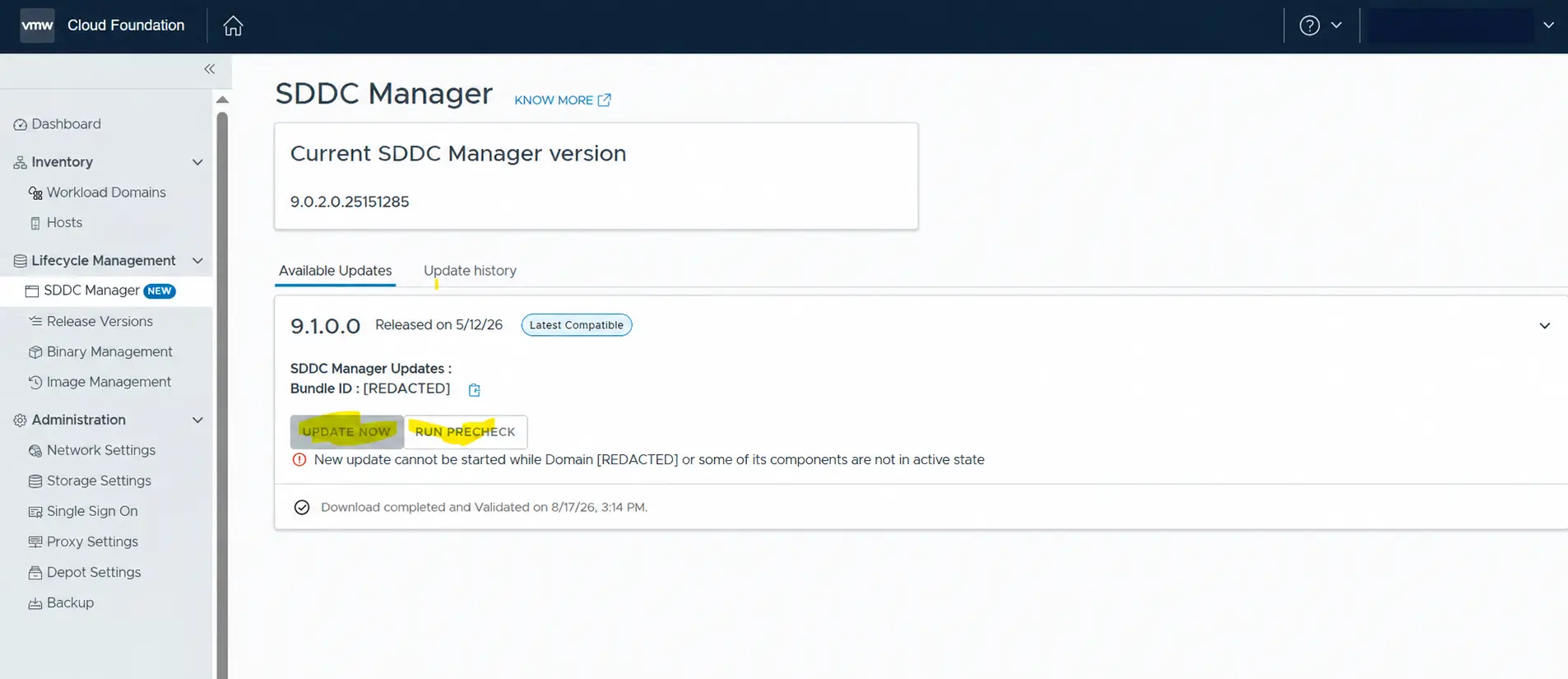
Support found that the infrastructure was healthy. The problem was stale inventory metadata in the SDDC Manager platform database, left behind after an earlier task failed to update properly. A component was still recorded in a state other than ACTIVE, so Lifecycle Management treated the domain as unhealthy and refused to continue.
After the actual component health was verified, Support corrected the stored status, restarted the appropriate services, and marked the case soft-resolved. The upgrade was attempted again during the next scheduled window. It failed again, this time with a status of Cancelled.
Cancelled Was Only the Beginning
Cancelled tells you where the workflow ended, but not how it got there. We did not know if another prerequisite had failed, an internal service stopped the task, or the cleanup from the earlier attempt had caused a new problem.
The next clue was a resource lock. SDDC Manager said the domain was locked by another operation and directed us to the Tasks panel, but the previous task was no longer running. The operation was gone while its locks were still hanging around, so we cleared them using Broadcom KB 407073 and synchronized the inventory.
At one point, we could not even generate the log bundle Support needed because log collection was failing around the same lingering operational state. The raw SoS output listed active SYSTEM and NSX locks under OPERATIONS_MANAGER, while its summary identified an active NSX workflow and advised waiting for it to complete or using a --force option that it explicitly did not recommend.
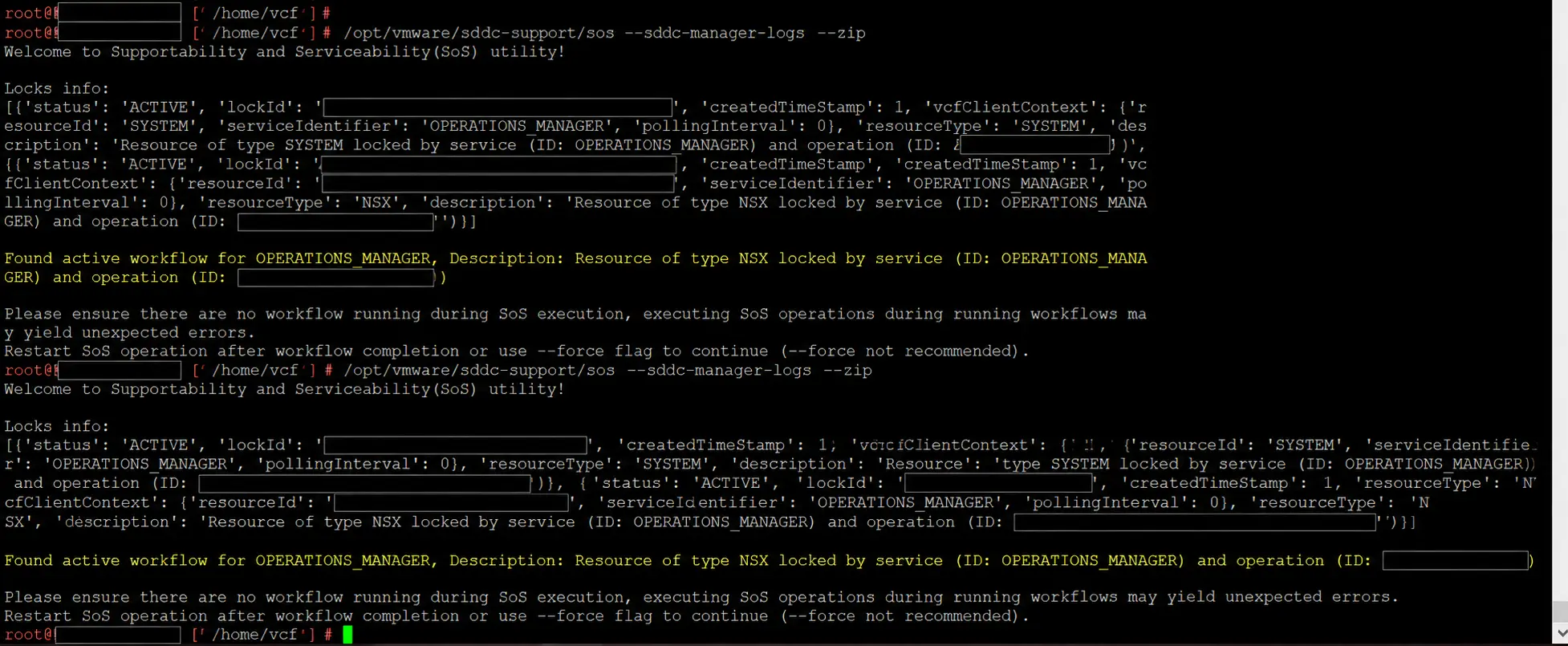
We had to clean up the locks from the failed upgrade so we could collect the logs needed to understand the failed upgrade. That is the kind of troubleshooting loop that burns through a maintenance window in a hurry.
Once the bundle was finally uploaded, Support found problems that had very little connection to the Cancelled status we saw in the interface.
What the Logs Eventually Showed
One problem involved UMDS and certificate trust. The native vmware-umds process did not trust the certificate chain presented through the proxy or online depot path. UMDS uses the appliance operating system’s trust store, and the log contained the detail we actually needed:
SSL certificate problem: unable to get local issuer certificate
I can work with that. It names the type of failure and gives me somewhere useful to start. Unfortunately, that information was sitting in a backend log rather than being carried back into the lifecycle workflow.
Support also found missing product-version catalog records, including records associated with VRSLCM and ESXi bundles. Part of the issue came down to how the SDDC Manager version was written. One source had the version stored like this:
9.0.2.0.25151285
The manifest expected this:
9.0.2.0-25151285
The only visible difference is a dot versus a hyphen before the build number, but Lifecycle Management performs an exact string comparison. The values did not match, and the catalog lookup could not find the records it expected.
Fixing that was not a normal UI correction. Support’s process involved taking a snapshot, temporarily changing manifest-polling behavior, correcting data in the LCM database and a product-version metadata file, and restarting services in a specific order. I am intentionally leaving the commands out because this was a support-directed change based on the state of that environment, not a general fix people should paste into every SDDC Manager that throws a similar error.
The important part is how far the final cause was from the message we started with. We went from Cancelled to stale locks, failed log collection, a certificate-trust issue, missing catalog records, and a one-character difference in a version string. There was no reasonable way to make that jump from the UI alone.
The Errors Are Not All Useless
During this same upgrade, one target-version error was actually useful. It listed the exact vCenter and ESXi upgrade and interoperability conflicts it had found, then separately reported that it could not determine the product version for NSX_ALB. The message was dense, but it identified real products and versions instead of stopping at a generic status.
There have been VCF errors that pointed me in the right direction. The Cloud Proxy registration error I hit during the Management Services deployment is a good example. It named the area that failed, and a search led to a Broadcom KB explaining the collector assignment that needed to be changed. I still had to do some research, but the message gave me something specific enough to research.
That is all I am really asking for. I do not expect the UI to repair stale database records or rewrite certificate trust automatically. I do expect it to preserve the useful part of the failure as the error moves from the backend service to the workflow shown in the UI.
If a domain is blocked because one inventory record is not ACTIVE, tell me which component it is and whether that state came from a live health check or the database. If a task is gone but left resource locks behind, show the locks instead of telling me to look for a running task that does not exist. If UMDS cannot validate a certificate, carry that failure into the lifecycle task instead of reducing the result to Cancelled. Even the catalog mismatch could have shown the version it found and the version it expected.
Those details may not eliminate the troubleshooting, but they would cut out a lot of guessing.
Why This Matters Before Production
This upgrade is still in non-prod, which is where we want to find issues like these. The problem is what they tell us about planning the production work. An engineer running an upgrade needs to know whether it is safe to retry, whether a component is truly unhealthy, and whether a failed task cleaned up after itself. A generic status does not give you enough information to make those calls with much confidence.
The actual fixes in these two examples were very different. One was a password that needed to be longer. The other involved stale state, resource locks, certificate trust, and lifecycle catalog data. What they had in common was the amount of work required to get from the message on the screen to the real problem.
I do not expect every VCF 9.1 upgrade to be flawless. VCF is too large and every enterprise environment has its own networking, certificates, proxies, lifecycle history, and assorted baggage. I do expect an error to leave me closer to the cause than I was before it appeared. When the first useful detail is buried several logs deep or does not show up until Support analyzes a bundle, the error handling still has work to do.
References
- Broadcom KB 368764: Domain inventory state is not active during an SDDC Manager Plan upgrade
- Broadcom KB 407073: SDDC synchronize domain inventory fails when the domain is locked
- Broadcom KB 444448: Resetting passwords for VMware Cloud Foundation Services Runtime
Continue the Conversation
Read the article, then join the discussion: VCF 9.1 Upgrade Failures: What Did the Error Actually Mean?