One of the things that stood out to me at VMware Explore was how much VMware Cloud Foundation is changing from something that feels like a collection of infrastructure products into something that behaves more like an actual private cloud platform.
I mentioned in my Explore kickoff article that I came home with quite a few things I wanted to dig into. The All Apps model in VCF 9.1 was one of them.
At first glance, it is easy to assume All Apps mostly means adding Kubernetes and containers alongside virtual machines. That is part of it, but after spending some time digging into the architecture, I think there is a much bigger shift happening underneath it.
For years, most of us have thought about VMware infrastructure in terms of vCenters, clusters, hosts, datastores, networks, and whatever automation we put in front of them. With All Apps, VCF is putting another abstraction layer above that infrastructure and presenting it through things like regions, organizations, projects, namespaces, quotas, policies, and services.
What is really changing is how the platform is exposed and consumed, and I think that changes the way we should think about operating VCF.
From VM Provisioning to Platform Consumption
Traditional infrastructure automation has mostly revolved around provisioning virtual machines. Someone requests a VM, automation figures out where it should go, attaches the right storage and network, applies whatever customization is required, and eventually hands it back to the consumer.
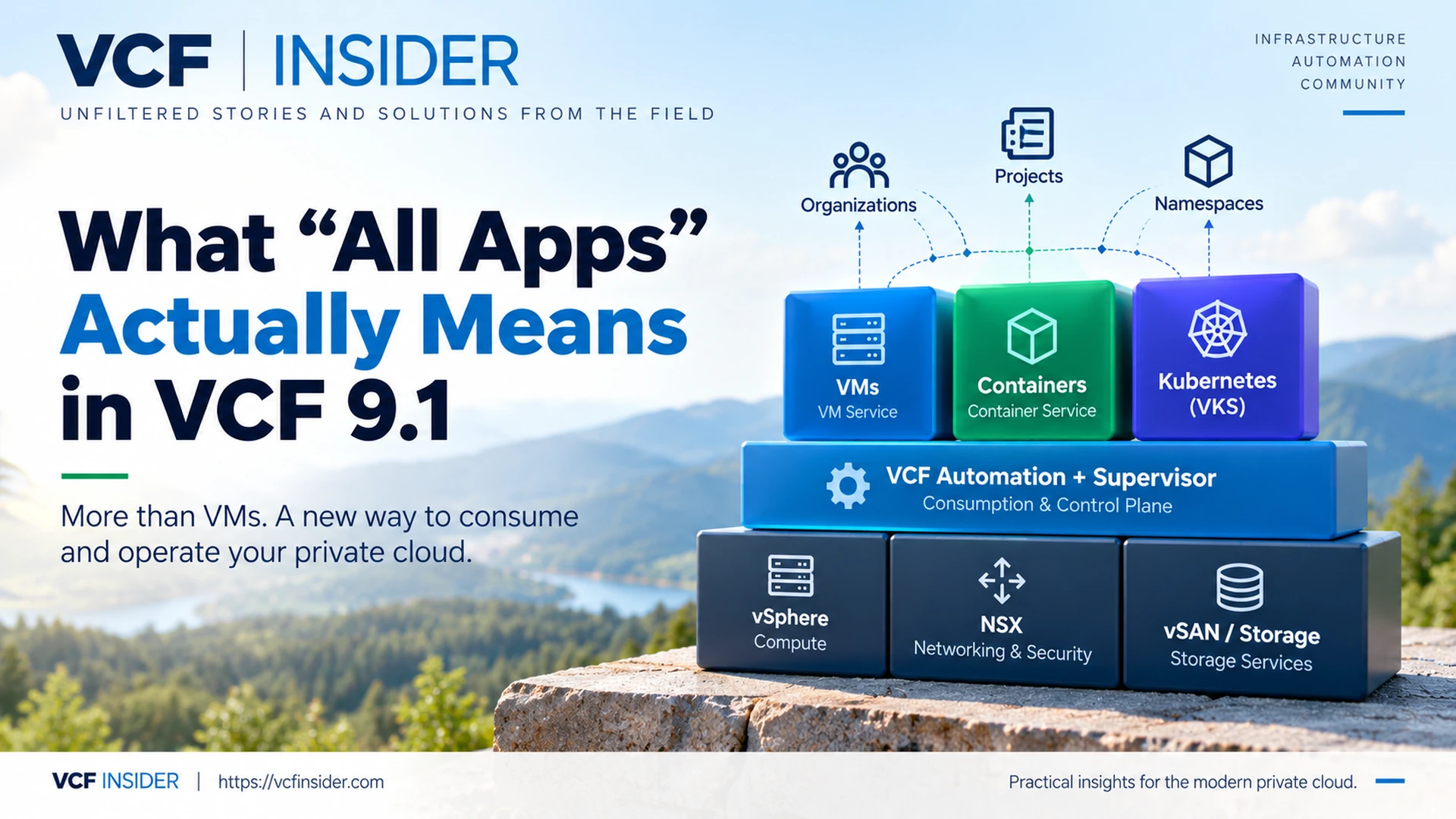
VCF Automation can still do all of that, but VCF 9.1 broadens the model quite a bit. Broadcom identifies three distinct runtime options: VM Service, Container Service, and VMware vSphere Kubernetes Service (VKS). Those runtime choices sit alongside networking, storage, centralized services, and other capabilities that can be exposed through the same private-cloud consumption layer.
That changes the question from “how do I automate this VM?” to something closer to “what services should this team be allowed to consume from the platform?”
That is the part I think matters most. A traditional virtualization platform is largely about providing infrastructure. The All Apps model pushes VCF toward providing services backed by that infrastructure, which is a much more cloud-like way of operating the environment.
The Supervisor Is the Piece That Makes This Work
One thing that became clearer during the Explore session was how important the Supervisor is to this whole model.
The Supervisor provides the control-plane capabilities that allow workloads and infrastructure services to be consumed through declarative APIs. Instead of handing consumers privileged access directly into vCenter or NSX, VMs, Kubernetes clusters, networking, storage, and other resources can be exposed through controlled platform interfaces.
From the infrastructure side, we still care about vCenter, ESXi, NSX, storage, lifecycle, availability, and all the usual operational details. None of that disappears. The difference is that consumers operate one layer above it, which means much of the underlying infrastructure becomes an implementation detail instead of something they have to interact with directly.
Regions, Organizations, Projects, and Namespaces
This is probably where a lot of long-time vSphere admins are going to have to adjust their mental model a little.
The hierarchy looks something like this:
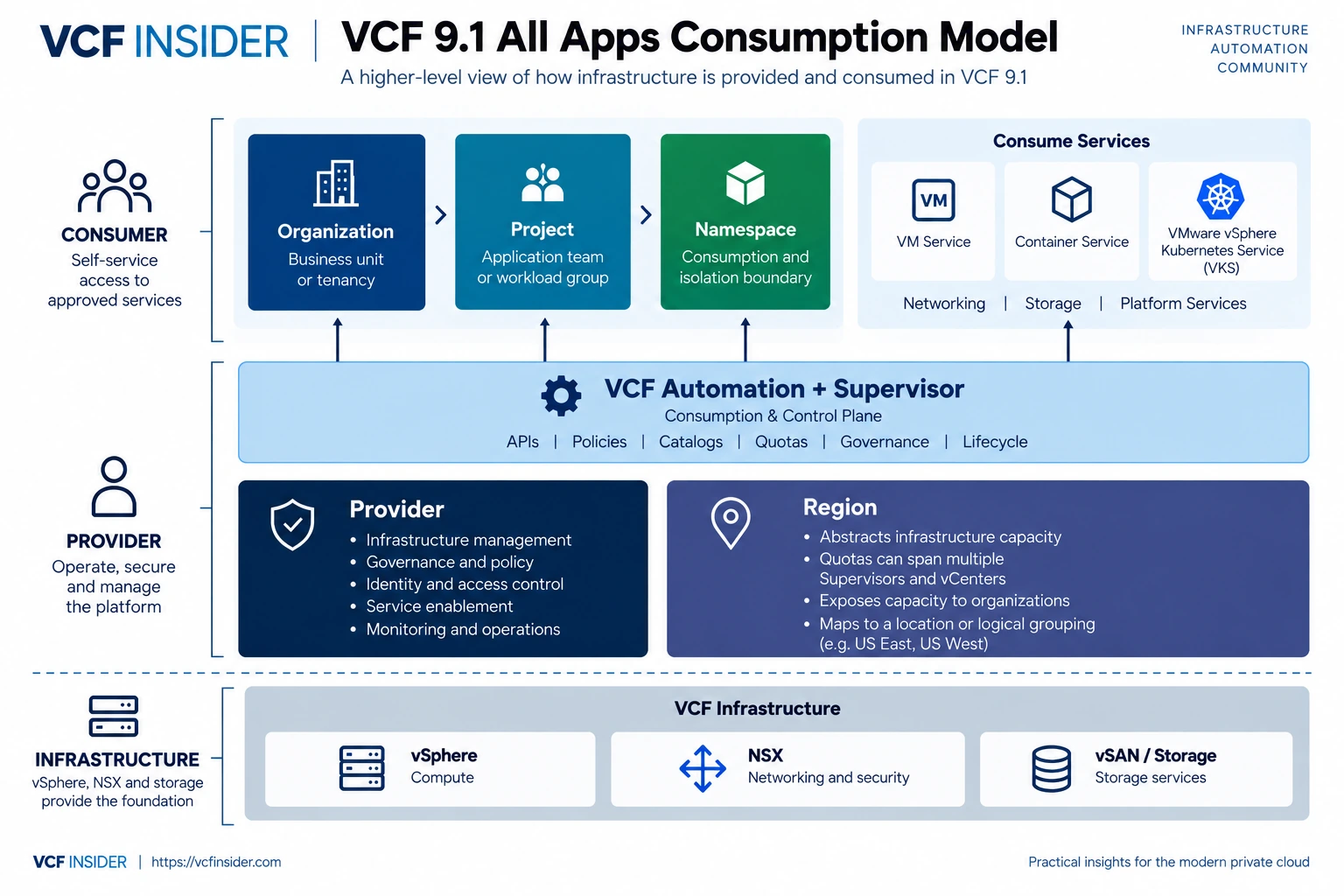
Provider → Region → Organization → Project → Namespace
The terminology starts sounding a lot like public cloud because that is essentially the kind of abstraction VCF is trying to create.
Provider
The provider is the team operating the platform. This is where infrastructure, governance, policies, quotas, available services, and access controls are defined.
Region
A region abstracts infrastructure capacity away from the consumer. One of the important improvements in VCF 9.1 is that regional quota can span multiple Supervisors and vCenters rather than being tied to a single Supervisor. Broadcom describes this as allowing organizations to consume infrastructure across multiple Supervisors as a more unified pool of capacity.
From the consumer side, that might simply look like US East or US West. They do not necessarily need to know which vCenter, cluster, or host is behind the service they are consuming.
Organization
An organization gives you a higher-level tenancy or business boundary. It becomes the container around users, projects, quotas, policies, and whatever services are made available to that group.
Project
Projects provide another layer of separation inside an organization. This is where you can start breaking things down by application team, engineering group, business unit, or however your operating model makes sense.
VCF 9.1 also adds project-level content libraries, allowing delegated project users to manage content such as ISOs and OVAs without requiring the provider team to handle everything centrally. Broadcom specifically calls out Packer workflows as one use case, which opens up some interesting possibilities around delegated image creation and lifecycle.
Namespace
The namespace is where all of this starts to come together. During the Explore session, it was described as the practical consumption and isolation boundary where workloads, networks, storage, quota, and services come together for the consumer.
For somebody coming from traditional vSphere, the easiest way I can describe it is that it feels a little like a resource pool that grew up and got a lot more responsibility. A namespace is not just about compute; it can also define which networks, storage classes, services, and capacity a user or application is allowed to consume.
That makes it much closer to a real consumer sandbox than anything we traditionally had in vSphere.
Quota Is Not the Same Thing as Utilization
One part of the Explore discussion that I thought was worth calling out was the difference between quota and actual utilization.
As virtualization engineers, most of us are used to thinking in terms of what the workload is actually consuming. We look at CPU demand, memory utilization, consolidation ratios, overcommit, and whether the physical cluster has enough headroom to keep doing what we are asking it to do.
The quota model adds another consideration. If a namespace has a 100 GB memory quota and somebody deploys a workload requesting that entire 100 GB, that allocation counts against the quota even if the workload is only actively using a fraction of it.
That is not a difficult concept, but it does change how capacity planning has to be approached. You are no longer looking only at physical utilization; you also have to understand how much capacity has been allocated or promised to consumers through the platform, and those numbers can be very different.
One Platform, Several Ways to Run Workloads
The name All Apps starts making more sense once you look at the runtime options together. VCF Automation is not trying to force everything into one model; instead, the platform exposes several runtime choices depending on what the workload actually needs.
VM Service provides a declarative way to deploy and manage virtual machines through the platform instead of requiring somebody to manually build them in vCenter.
VKS provides Kubernetes as a platform service, and VCF 9.1 aligns VKS cluster management with the broader VCF API pattern. That gives administrators and consumers a more consistent way to interact with VMs, containers, and Kubernetes through tools such as VCF CLI, Terraform, and kubectl.
Then there is Container Service, which I suspect will be unfamiliar to quite a few traditional VMware admins. It provides a lightweight container runtime that executes directly on ESX without requiring a full Kubernetes cluster. Broadcom describes the experience as serverless-like, with the platform handling things such as scheduling, isolation, lifecycle, and upgrades.
That gives VCF an interesting middle ground: if an application needs containers but does not need an entire Kubernetes platform, you do not necessarily have to deploy one just because the workload happens to be containerized.
Networking and Storage Have to Be Part of the Same Model
If VCF is really going to act like a private cloud, self-service cannot stop at compute. The user cannot request a workload through an API and then wait for somebody to manually build everything around it, which is where the tighter integration with NSX becomes especially important.
VCF 9.1 expands tenant networking capabilities with things such as IP allocation, multiple CIDRs, transit gateways, shared subnets, VLAN connectivity, firewalls, and other self-service networking options. The idea is that networking becomes part of the service the platform provides rather than a separate process that gets bolted onto provisioning afterward.
Storage follows the same basic idea. Storage capabilities can be exposed through policy-driven classes that workloads consume without requiring the user to understand which datastore or underlying storage system is actually delivering the capacity.
The abstraction is what matters. The consumer asks for the service, while the provider remains responsible for how that service is delivered.
The Provider/Consumer Split Is the Bigger Story
The more I looked at All Apps, the less I thought the individual runtime features were the main story. The bigger change is the separation between the people operating the infrastructure and the people consuming it.
The provider side still owns the hard stuff: ESXi, vCenter, NSX, storage, lifecycle management, capacity, security, availability, and everything else required to keep the platform healthy. The consumer side works with regions, projects, namespaces, catalogs, quotas, APIs, and whatever services have been made available to them.
That is a pretty different model from simply giving somebody access to vCenter or throwing another automation blueprint in front of the same infrastructure. If you start exposing compute, Kubernetes, containers, networking, storage, databases, and eventually things like AI services through a common platform, you are not just running virtualization anymore. You are operating an internal cloud platform, and that brings a different set of operational responsibilities with it.
This Is Where the Hard Part Starts
Turning on a service is the easy part. Deciding how you want the platform to work six months or two years from now is where things get interesting.
Somebody has to decide what a region means in your environment, how organizations and projects should be divided, what a namespace should represent, how quota should be allocated, which services should be exposed, and how much control should be delegated to the teams consuming them.
VCF 9.1 gives platform teams more tools to support that model, including namespace delegation, infrastructure placement policies, project-level content libraries, regional quota management, and project and namespace cost visibility.
Those capabilities are useful, but they also mean there are more design decisions to make. The risk is not that VCF cannot provide enough self-service; it is enabling all of it without first deciding what the operating model is supposed to look like.
That is the part I think VCF teams are going to need to spend some time on.
Where VKS, DSM, and Private AI Start to Fit
Once the All Apps architecture makes sense, some of the other pieces of VCF start making more sense too. VKS is one example, Data Services Manager is another, and Private AI is probably one of the more interesting ones because it pulls several of these platform capabilities together.
VCF 9.1 also centralizes service management so services can be onboarded, managed, and exposed to consumers through the platform. Broadcom lists services such as Harbor, VMware Data Services Manager, Secret Store Service, VKS cluster management services, and encryption management among the services integrated into this model.
I am not going too far down that rabbit hole here because VKS and Private AI both deserve their own articles. For this one, the important thing is understanding why this consumption architecture exists in the first place.
The Feature List Does Not Really Tell the Whole Story
If you read through the VCF 9.1 feature list, it is easy to focus on the individual additions: faster deployments, more networking options, quotas, content libraries, containers, and whatever else happens to matter in your environment. Taken individually, those are useful features. Taken together, though, they point to a much bigger change in how VCF is meant to be consumed.
For years, a lot of us have thought about VMware infrastructure in terms of questions like which vCenter a workload belongs in, which cluster should host it, which datastore it should use, and which network it needs. The All Apps model starts moving those decisions further behind the platform. The consumer increasingly thinks in terms of regions, projects, namespaces, quotas, and services instead of the physical and logical infrastructure underneath them.
That is the shift I came away from Explore thinking about the most. VCF 9.1 is not just adding more ways to deploy workloads; it is changing the abstraction between the infrastructure team and the people consuming the platform. For anyone who has spent years operating VMware from the infrastructure side, that is a much bigger change than the name All Apps initially makes it sound.
References
- Accelerate, Streamline, and Control Your Self-Service Private Cloud with VMware Cloud Foundation 9.1
Continue the Conversation
Have a question, a different approach, or something you have learned from the field?
Join the VCF Insider Community to connect with other engineers, homelab builders, and virtualization folks working through real-world VCF deployments, troubleshooting, automation, architecture, and lessons learned.