In Part 1, I focused on why a recoverable backup may still be the wrong thing to restore. The next question is more practical: if the newest recovery point cannot automatically be trusted, how do you decide where to begin?
VCF 9.1 does not answer that question by magically stamping a snapshot clean. It gives the recovery team a workflow for examining recovery history, selecting a candidate, starting it in an isolated clean room, analyzing it, and rejecting it when the evidence is not strong enough. The goal is not certainty from a single graph, badge, or security scan. It is to build enough confidence to make the next recovery decision.
That distinction matters because the recovery process is no longer a straight line from backup to production. It starts looking much more like an investigation.
Reading the Recovery-Point Timeline
The recovery-point timeline is where that investigation begins. When a VM enters validation, the timeline lets the recovery team examine historical snapshots and compare activity across them. The same timeline is available when the team decides to try a different snapshot during validation.
The photo below came from the VMware Explore Protection and Recovery session that started this article series. It is not a polished product screenshot, but it shows the actual interface: snapshots distributed across time, activity changing around a particular window, a selected recovery point, and the option to start the VM in an isolated clean room.
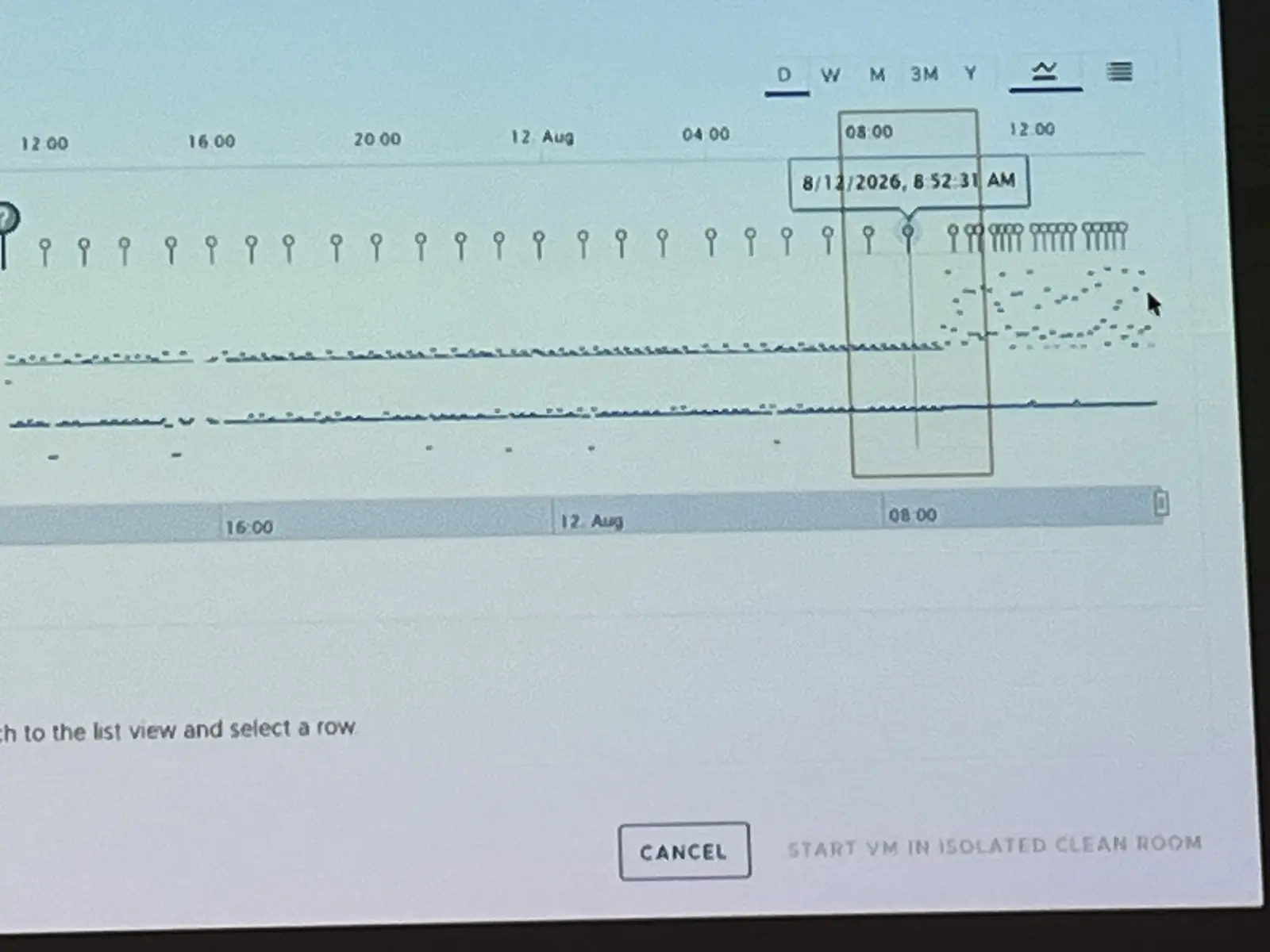
Two of the signals displayed on that timeline are change rate and entropy rate.
Change rate measures the number of bytes changed over the time between the current snapshot and the previous snapshot. If a VM normally changes at a fairly consistent rate and then that rate suddenly increases, the snapshot deserves more investigation. Ransomware encrypting large numbers of files can produce that kind of increase, but ransomware is not the only workload activity that can change a lot of data.
Entropy is presented through the relationship between compressed and uncompressed data. Data that is difficult to compress has an entropy rate closer to 1. Encryption can produce highly randomized, less-compressible data, so a sudden jump can be suspicious. Already-compressed application data can also be difficult to compress, which is why entropy is an indicator rather than a verdict.
The useful pattern is not simply “high number equals ransomware.” The recovery team is looking for behavior that is unusual for that VM, at that time, compared with its own history and similar workloads. A spike in both change rate and entropy can help narrow the investigation window, but it does not prove what caused the spike or whether every snapshot before it is trustworthy.
Broadcom’s documentation includes another detail I found interesting: timeline metrics can remain visible even after the snapshots that produced them have expired. That can preserve evidence of a suspicious period between the recovery points that are still available. It cannot bring an expired snapshot back, but it can influence whether the team selects an earlier or later candidate.
Important distinction: Change rate, entropy, snapshot badges, and EDR findings all contribute evidence. No single signal proves that a recovery point is safe to return to production.

Retention Determines How Far Back You Can Investigate
Part 1 mentioned Grandfather-Father-Son retention because that was how many of us created recovery depth before virtualization changed the backup world. VCF 9.1 brings that same basic idea into hierarchical snapshot retention with hourly, daily, weekly, and monthly tiers.
During normal recovery, retention is usually discussed in terms of capacity, RPO, compliance, and how far back the business may need to restore. During a cyber incident, it also determines how much history the recovery team can investigate. If the compromise began six weeks before anyone detected it but usable recovery history only reaches back four weeks, no amount of timeline analysis can manufacture the missing recovery point.
VCF 9.1 includes three quick-selection templates:
| Template | Documented values |
|---|---|
| Default | 1-hour RPO, keep the last 12 snapshots, and keep daily snapshots for two weeks. Estimated snapshot count: 26. |
| Ransomware recovery | 1-hour RPO, keep the last snapshot, hourly snapshots for one day, daily snapshots for one week, weekly snapshots for one month, and monthly snapshots for six months. |
| Short-term retention | 1-hour RPO, keep the last snapshot, hourly snapshots for one day, daily snapshots for one week, and weekly snapshots for one month. |
Those are Broadcom-supplied starting points, not recommendations for every environment and not settings from my environment. The right schedule still depends on workload change rate, storage capacity, application requirements, regulatory obligations, and the recovery scenarios the organization is preparing for.
The practical lesson is simpler: retention is part of incident readiness. Recovery teams should know how far back they can realistically investigate before an incident forces them to find out.
Selecting and Badging a Candidate
Once the timeline has narrowed the search, the team selects a recovery point for validation. It is still a candidate recovery point. Selection means the evidence makes it worth investigating; it does not mean the candidate has passed validation.
Snapshot badges help record what the team has learned and communicate it to other people working the incident. VCF 9.1 defines the following badges:
| Badge | Product meaning |
|---|---|
| Not badged | No badge has been assigned. |
| Unknown | The snapshot has been restored for validation, but no determination has been made. |
| Verified | The snapshot is marked safe. |
| Warning | There are concerns about the snapshot. |
| Compromised | Malware has been confirmed. |
| Encrypted | Data encryption has been confirmed. |
The badge is useful because cyber recovery is rarely a one-person process. Infrastructure, security, application, identity, and business teams may all contribute to the decision. Recording that a snapshot was investigated and rejected keeps another person from unknowingly repeating the same work.
I would still treat a Verified badge as the recorded outcome of the validation process, not as a magical property of the snapshot. The confidence behind it is only as strong as the analysis, remediation, and approval process that led to it.
The Clean Room Still Needs a Security Engine
After a candidate is selected, the VM is powered on in the isolated recovery environment instead of being returned directly to production. In the In validation state, the clean-room orchestrator manages the VM while the team investigates it. Administrators can log in, patch vulnerabilities, change network-isolation levels, remove malware, or decide to use another snapshot.
There is an important product requirement here: VCF 9.1 does not provide the integrated security analysis by itself. To use integrated vulnerability, behavioral, and malware analysis, the recovery environment must be configured with either Carbon Black or CrowdStrike.
Broadcom documents both integrations. The clean-room configuration presents them as provider choices, and the documentation describes deactivating the ransomware-recovery service when switching between Carbon Black and CrowdStrike. I found no support statement for running both providers simultaneously in the same integrated workflow.
That is worth spelling out because “EDR integration” can sound like a checkbox that comes entirely from the recovery platform. VCF orchestrates the recovery workflow and creates the isolated place where analysis occurs, but one of those supported security services supplies the integrated scanning and behavioral analysis. The recovery design therefore needs that dependency planned, licensed, connected, and tested before an incident.
CrowdStrike is the integration highlighted in the VCF 9.1 announcement and was demonstrated as part of the guided recovery workflow. Carbon Black is also documented as a supported choice. Mentioning either product here is not an endorsement. The larger point is that the recovery platform and the security platform have different jobs, and the workflow depends on both being ready.
The security service can perform malware-signature scanning, vulnerability analysis, and behavioral analysis in the isolated environment. Those findings are important, especially when an attack may not leave a simple malicious file to detect. They are still one part of the evidence. Application behavior, identity configuration, persistence mechanisms, network activity, operating-system state, and the organization’s incident findings may all influence whether the candidate is acceptable.
Remediate, Reject, or Continue
A candidate does not have to be untouched to be useful. During validation, the team may patch vulnerabilities or remove malware and then determine whether the remediated state is acceptable. That decision needs to be deliberate because the changes performed during validation can persist when the VM moves forward through staging and recovery.
If the evidence is not strong enough, the workflow supports Try Different Snapshot. The administrator can select another point from the timeline or snapshot list and badge the current snapshot for future reference.
The exact behavior is now clear in the VCF 9.1 documentation: when a different snapshot is selected, the current iteration of the VM in the isolated clean room is discarded and a new iteration begins from the newly selected snapshot. That is the investigation loop Part 1 was leading toward:
timeline evidence → candidate → isolation → analysis and remediation → accept or reject → repeat when necessary
Rejecting the first candidate is not a failure of the process. It is the process doing what it was designed to do.
From Validation Toward Recovery
VCF 9.1 describes five main ransomware-recovery states:
| State | What it represents |
|---|---|
| In backup | The VM belongs to the recovery plan, has been replicated to the recovery site, and is available for snapshot selection. |
| In validation | The selected snapshot is powered on and managed inside the clean room for investigation, analysis, and remediation. |
| Validated | Analysis is complete, the VM has been badged, and it is ready to be staged. |
| Staged | The VM has left the clean room, is powered off, and is ready for recovery. Changes made during validation are preserved. |
| Recovered | The VM has been recovered on the recovery site. |
There are also transitional states while the platform prepares validation, enters the validated state, stages, recovers, or discards a test VM. The important part is that Validated and Recovered are not the same thing. Validation establishes that the candidate is ready for the next controlled step. Recovery actually places it into service at the recovery site.
The product workflow also does not replace the organization’s incident command and approval process. A VM can complete technical validation while the security team is still investigating stolen credentials, compromised identity systems, persistence outside the guest operating system, or another dependency that makes reconnecting the workload unsafe.
That separation is healthy. Infrastructure automation can make the recovery process repeatable, but the final decision to return a workload to service remains a technical and business risk decision.
Enough Confidence to Move Forward
Part 1 asked whether a recoverable backup could still be the wrong thing to restore. Part 2 shows how VCF 9.1 turns that question into a workflow.
The recovery team examines the timeline, uses change rate and entropy to narrow the investigation window, checks whether retention reaches far enough back, selects and badges a candidate, and starts it inside the isolated recovery environment. Carbon Black or CrowdStrike supplies the integrated security analysis. The team can remediate the candidate, reject it, discard that clean-room iteration, and repeat the process with another snapshot.
None of those steps provides absolute certainty by itself. Together, they create a structured body of evidence and a repeatable way to decide whether the organization has enough confidence to move forward.
That is what verify before you trust looks like in practice.
References
- VCF Insider — Cyber Recovery: Just Because You Can Restore It Doesn’t Mean You Should
- Broadcom TechDocs — Snapshot Timeline: Change Rate and Entropy Rate
- Broadcom TechDocs — Badge a Snapshot
- Broadcom TechDocs — Try a Different Snapshot
- Broadcom TechDocs — Ransomware Recovery States
- Broadcom TechDocs — Enable Ransomware Recovery Services for Carbon Black
- Broadcom TechDocs — Enable Ransomware Recovery Services for CrowdStrike
- Broadcom TechDocs — Deactivate Ransomware Recovery Services
- VMware — vSAN Protection and Recovery Enhancements for VCF 9.1
- VMware — VMware and CrowdStrike Deliver New Integration for Cyber Recovery Workflows
Continue the Conversation
Read the article, then join the discussion: Cyber Recovery Part 2: How Do You Find a Recovery Point You Can Trust?